
PSA Birth Certificate Online Philippines 2026 (Complete Step-by-Step Guide)
Requesting a PSA Birth Certificate Online Philippines has completely revolutionized how Filipinos secure their most crucial identification document. Gone are the days of camping outside the civil registry office before dawn, skipping a day of work, just to get a queue number. Today, whether you need it for a passport application, your first job, or school enrollment, the entire process can be completed directly from your smartphone while sitting at home.
However, while getting your PSA Birth Certificate online is incredibly convenient, the system is strict and the process is not always flawless. Thousands of applicants experience frustrating delivery delays, package rejections due to strict ID rules, or the panic of receiving a “Negative Certification” (which means no record was found). Furthermore, many are still confused about which official website to actually use, and how to deal with the new e-certificates.
Based on our experience assisting hundreds of applicants through government documentation, this ultimate 2026 pillar guide covers everything you need to know about processing your PSA online request, walking in via the new Appointment System, and troubleshooting missing records. We will walk you through the exact steps, compare the official providers, and share real-world tips to ensure your document arrives safely at your doorstep without wasting your hard-earned money.
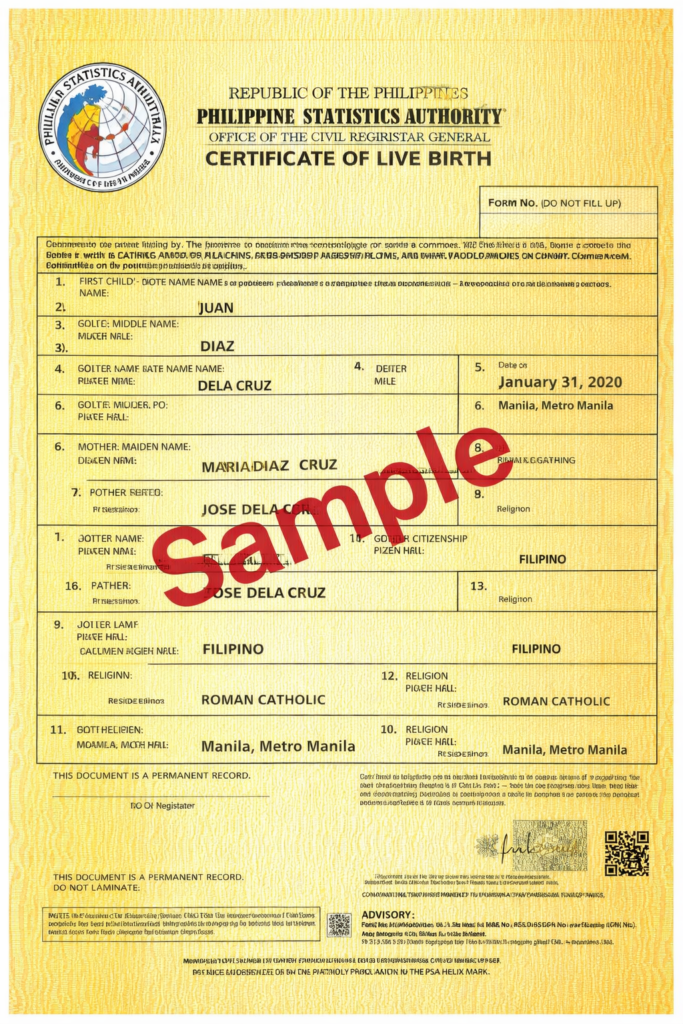
The Mother of All IDs: Why You Strictly Need This Document
In the Philippines, the birth certificate is often referred to as the “Mother of All IDs.” You simply cannot acquire any other primary valid ID without first presenting it. Printed on special Security Paper (SECPA) with a distinct yellow-green background, complex barcodes, and a unique transaction code, it is the ultimate legal proof of your identity, age, and Filipino citizenship.
You will strictly need to present a fresh, highly readable PSA Birth Certificate copy for the following major life events and legal transactions:
- DFA Passport Application and Renewal: The Department of Foreign Affairs is notoriously strict. They require a crisp, highly readable record. If your current copy is blurred, has a typo, or is an old format, they will reject your passport application immediately.
- LTO Driver’s License and Permits: The Land Transportation Office strictly requires a clear PSA copy when you apply for your LTO Student Permit Requirements or when upgrading to a Non-Professional license.
- First-Time Job Seekers: Fresh graduates need this to secure other pre-employment documents like your NBI Clearance Online, PhilHealth ID, Pag-IBIG MDF, and SSS registration.
- Marriage Licenses: Both the bride and groom must submit a recent copy of their birth record along with a CENOMAR (Certificate of No Marriage) to the Local Civil Registry before a wedding can take place.
- PRC Board Examinations: The Professional Regulation Commission requires this to verify the identity and citizenship of board examinees before they can take their licensure tests.
- School and University Enrollment: From DepEd public schools to CHED institutions, this is mandatory for student registration to ensure accurate academic records.
Is the NSO Birth Certificate Still Valid? (NSO to PSA Birth Certificate Guide)
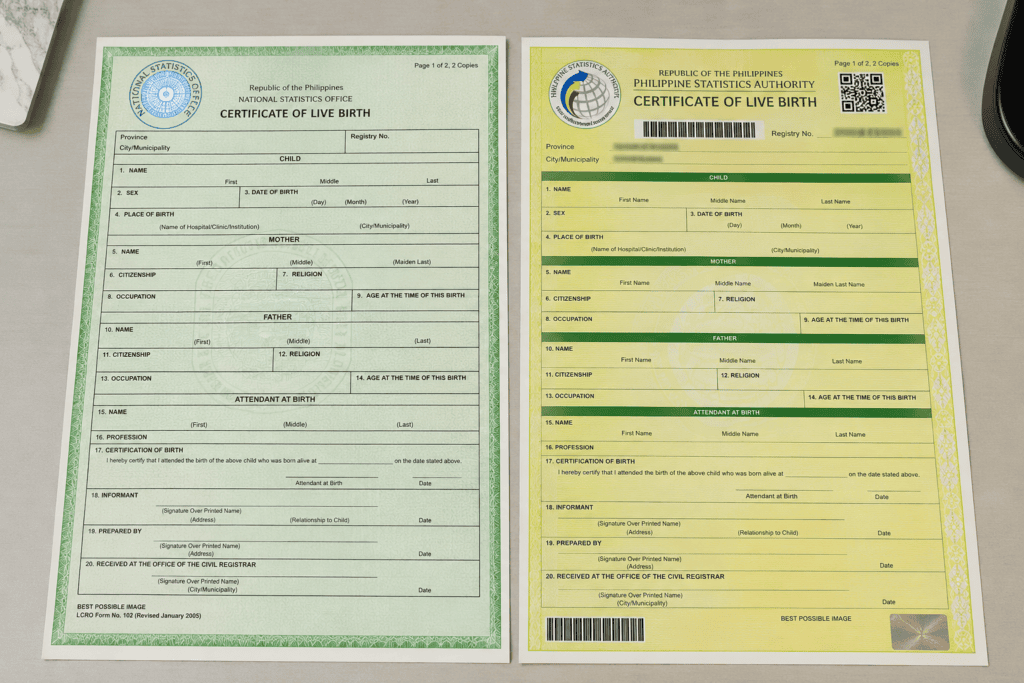
Many Filipinos are searching for how to convert their NSO to PSA birth certificate. If you look at your old documents, you might still have a green paper bearing the “NSO” (National Statistics Office) logo. In 2013, the NSO merged with other government statistical agencies to become the Philippine Statistics Authority (PSA). As a result, the old green NSO certificates were replaced by the new yellow-green PSA format with enhanced anti-counterfeiting features.
According to Republic Act No. 11909 (Permanent Validity of the Certificates of Live Birth, Death, and Marriage Act), which was passed into law, your old NSO certificate legally has permanent validity. The law explicitly prohibits government agencies and private companies from requiring you to get a new birth certificate if your old one is still readable and intact.
However, in actual practice, critical government agencies like the DFA (for passports) and foreign embassies will almost always request the newly printed PSA version. Why? Because the old NSO papers fade over time, and the new SECPA format is easier for their machines to scan and verify.
Do you need to process a legal “change” or update to get the new one? No. You simply need to request a new copy online, and the government will automatically print your existing record on the new PSA Security Paper (SECPA). The content remains exactly the same.
Complete Requirements for PSA Birth Certificate (2026)
Before you open the official portal to apply, ensure you have gathered the exact requirements for PSA birth certificate processing. Having this ready prevents session timeouts while filling out the online form, which can reset your progress.
Information You Must Know Before Applying:
- Complete Full Name: The exact first, middle, and last name of the document owner as registered.
- Exact Date and Place of Birth: The municipality and province where the person was born.
- Mother’s Complete Maiden Name: (Warning: This is a major trap!) Make sure you use your mother’s name exactly as it was before she was married. If you use her current married name, the system will yield a “Negative Certification.”
- Father’s Complete Name: As written on the original registry.
- Purpose of Request: (e.g., Passport/Travel, Employment, School, Local Civil Registry).
Valid IDs Required (For Delivery and Walk-ins):
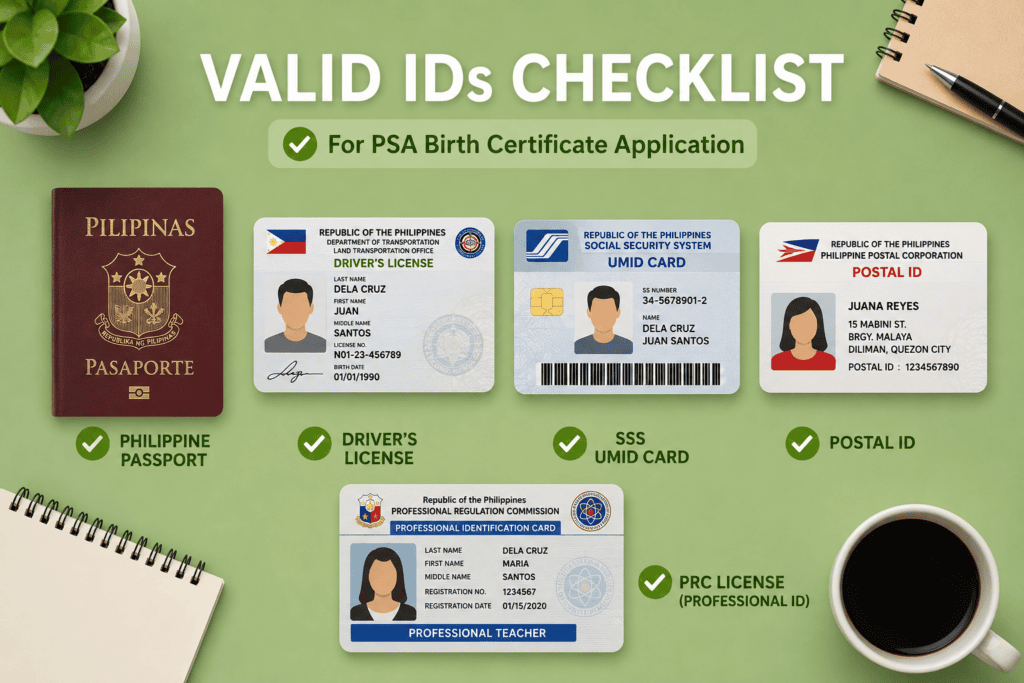
You do not need to upload an ID online, but you MUST present the original physical copy to the courier upon delivery, or to the guard if you are doing a walk-in application. Accepted primary IDs include:
- Philippine Passport
- PhilSys National ID (Physical Card or ePhilID)
- SSS / GSIS / UMID Card
- LTO Driver’s License
- PRC License
- Postal ID
- Voter’s ID or Voter’s Certification
Who Can Request a PSA Document?
Under Philippine law (the Data Privacy Act), civil registry documents are highly confidential. Not just anyone can request your birth certificate. You can only request it if you are:
- The document owner himself/herself (must be of legal age, 18 years old and above).
- The parent of the document owner.
- The legal spouse of the document owner.
- The direct descendants of the document owner (children).
- An authorized representative (must have a valid SPA or Authorization Letter).
PSA Authorization Letter Sample Format (2026)
If you are requesting a PSA Birth Certificate for someone else (like a sibling, or your adult child who is at work), couriers and PSA CRS outlets will strictly not release the document unless you have a valid PSA authorization letter. You can simply copy and paste the template below, fill in the blanks, and print it out.
[Current Date]
Philippine Statistics Authority
To whom it may concern,
I, [Name of the Birth Certificate Owner], hereby authorize my [Relationship to Representative, e.g., Brother/Sister], [Name of the Representative], to claim my original PSA Birth Certificate on my behalf.
Attached to this letter is a photocopy of my valid government-issued ID, as well as the valid ID of my authorized representative for your verification.
Sincerely,
[Your Signature]
[Your Printed Name]
Which Official Site Should You Use? (PSAHelpline vs. PSA Serbilis)
When searching for “PSA Online,” you will immediately notice there are two official websites. This causes massive confusion. Here is the definitive difference between the two platforms to help you choose the right one for your situation:
1. PSAHelpline.ph (Best for Local Deliveries in the Philippines)
PSAHelpline.ph is an authorized partner of the government. It is heavily optimized and designed specifically for applicants who are currently residing inside the Philippines.
- Coverage: Nationwide delivery within the Philippines only. Cannot ship abroad.
- Payment Methods: Highly versatile. You can pay instantly using GCash, Maya, Visa/Mastercard, ShopeePay, 7-Eleven, Bayad Center, and Palawan Pawnshop.
- Courier: Uses premium private couriers (like LBC, 2GO, or Air21), resulting in much faster and more reliable delivery tracking (usually 3-7 days depending on the province).
2. PSA Serbilis (Best for OFWs and International Deliveries)
PSA Serbilis is the government’s older, in-house platform. While it caters to local deliveries, its primary advantage is that it is the only platform that handles international shipping for Overseas Filipino Workers (OFWs) or migrants living abroad.
- Coverage: Local and International delivery to almost any country globally.
- International Courier: PhilPost (Philippine Postal Corporation) for global shipping, which can take weeks depending on the destination country.
- Payment Methods: Credit Card, BDO, UnionBank, Bayad Center.
How Much is the PSA Birth Certificate Online (2026 Fees)?
The total cost will depend on the method you choose to obtain the document. Note that online delivery is more expensive due to processing and courier fees, but saves you from taking a leave of absence from work.
- Online Delivery (PSAHelpline / Serbilis): ₱365.00 per copy. This already includes the government processing fee and the nationwide door-to-door courier delivery. (For international delivery via Serbilis, it costs $20.30 USD).
- PSA E-Certificate (Digital PDF Copy): ₱130.00 per copy. This is a newly introduced digital PDF format valid for specific online submissions.
- Walk-in (PSA CRS Outlet): ₱180.00 per copy (Discounted to ₱155.00 for Senior Citizens/PWD). Note that walk-ins require you to book a slot first via the PSA Online Appointment System.
Step-by-Step Guide: How to Apply via PSAHelpline
Because the vast majority of our readers are based locally, we will focus this detailed tutorial on PSAHelpline, which offers the fastest local delivery for a PSA Birth Certificate Online Philippines request.
- Visit the Portal: Go to PSAHelpline.ph and click “Order Now.” Select “Birth Certificate.”
- Accept Terms and Conditions: You must agree to the Data Privacy Act guidelines.
- Identify the Owner: Choose whether you are requesting for yourself or for someone else (child, parent, spouse).
- Fill in the Application Form: Input your details carefully. Check for typos. A single misspelled letter can result in a “Negative Certification.” You will also be asked for the purpose of your request.
- Enter Delivery Information: Provide your complete address. Include house numbers, street names, barangays, and a recognizable landmark. Enter an active mobile number that you answer regularly. Couriers will call this number when they are near.
- Review Your Details: The system will show a summary of your inputs. Double-check everything, especially the spelling of the mother’s maiden name.
- Payment: Select your preferred payment channel (GCash is highly recommended for real-time posting). Once the ₱365 fee is paid, you will instantly receive a 10-digit Reference Number via SMS and email.
The Alternative: How to Use the PSA CRS Appointment System (Walk-In)
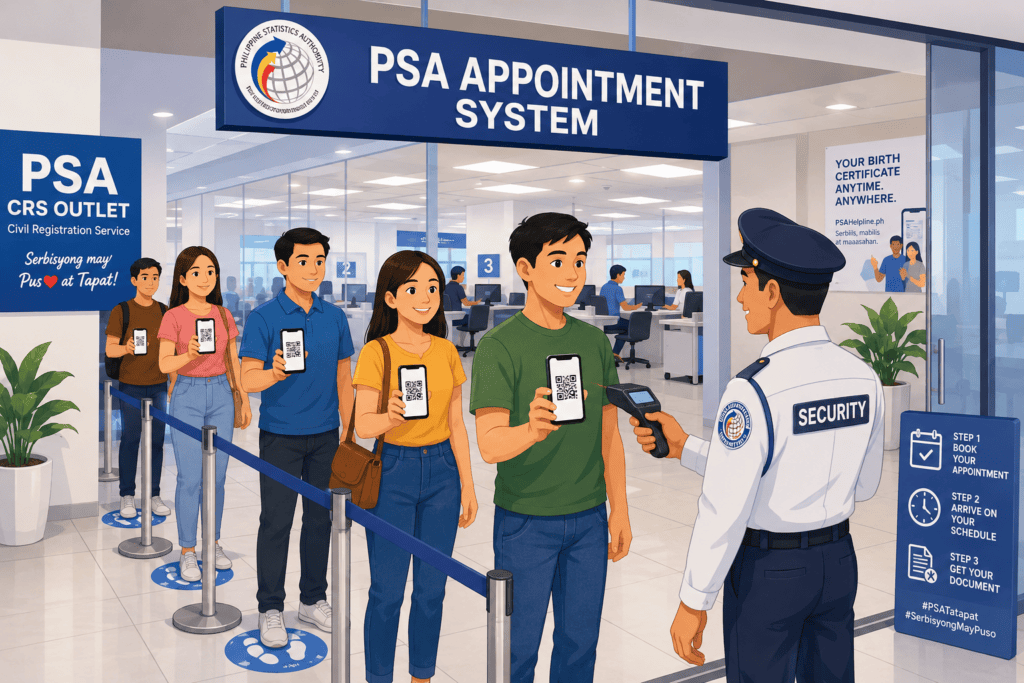
If you need the document immediately (within the day) and cannot wait for the 3-7 days delivery time, your best option is to do a Walk-in application. However, due to the volume of applicants, the PSA no longer accepts walk-ins without a prior online appointment.
- Go to the official appointment portal: crs-appointment.psahelpline.ph.
- Select the specific PSA CRS Outlet nearest to your location (e.g., East Avenue, Quezon City; or SM Megamall).
- Provide your name, email, and mobile number.
- Select your preferred date and time slot from the available calendar.
- You will receive a QR Code via email. Print this or save it on your phone.
- On your scheduled date, proceed to the PSA outlet. Present your QR Code and valid ID to the guard. You will pay the ₱180 fee at the cashier and claim your document within the hour.
Strict Rules for Receiving Your Delivery (Do Not Ignore)
If you opted for online delivery, be warned: The number one reason applications fail is at the delivery stage. The government is incredibly strict about who can receive civil registry documents. Keep these rules in mind:
- Personal Receipt is Mandatory: If you requested the document for yourself, YOU must be the one to receive it from the courier.
- NO Authorization Letters Allowed for Delivery: If you used the online portal, couriers strictly do not accept authorization letters. If you are at work and the rider arrives at your house, they will not leave the document with your mother or your sibling. They will take it back to the hub.
- Prepare a Valid ID: You must present an original valid ID to the courier. Warning: Company IDs, expired IDs, PhilHealth paper IDs, and generic school IDs are generally NOT accepted by couriers.
- Missed Deliveries: Couriers usually make two to three delivery attempts. If you miss all attempts, the document will be returned to the main PSA facility, and your payment will be forfeited. You will have to apply and pay again.
Advanced Troubleshooting: Missing Records and Errors
Ordering the document is the easy part. But what happens if the document arrives and there is a massive problem? Here are the most common issues applicants face and the exact legal remedies to fix them.
Issue 1: You Received a “Negative Certification” (CENOMAR/Yellow Paper)
Sometimes, instead of a birth certificate, you receive a yellow paper stating “No Record Found.” This happens if your birth was never officially registered by the hospital or midwife, your records were destroyed in a fire or typhoon at the local city hall, or you made a severe typo on the online form (especially on the mother’s maiden name).
The Fix: You cannot fix this online. You must bring the yellow Negative Certification to the Local Civil Registry (LCR) of the municipality where you were born and file for a Delayed Registration of Birth. This legal process requires affidavits, baptismal certificates, and school records to prove your existence and date of birth.
Issue 2: The Certificate is Blurred or Unreadable
If you are applying for a DFA Passport, the evaluator will reject your birth certificate if your name, date of birth, or your parents’ names are smudged, cut off, or illegible on the official copy. This usually happens to older records encoded via typewriter.
The Fix: Do not order another online copy; the system will just print the exact same blurred digital image from their archives. You need to go to your Local Civil Registry and request an Endorsement of Clear Copy to PSA (sometimes called an Advance Copy). The LCR will find their physical, clear copy in their local archives, transcribe it, and forward it directly to the headquarters in Manila to update your digital file.
Issue 3: Misspelled Name or Wrong Gender
Your name is “Maria” but the birth certificate says “Marie.” Or you are male, but the certificate says “Female.”
The Fix: You need to file a petition under Republic Act 9048 (The Clerical Error Law). This law allows you to correct typographical errors or change your first name without having to go through a costly trial court proceeding. You must file this petition at the Local Civil Registry where your birth was registered. If you were born in the province but currently live in Manila, you can file it as an “Out-of-Town Reporting” at your nearest City Hall, but note that it will take several months longer to process.
Frequently Asked Questions (FAQs)
1. Can I get my PSA immediately?
If you use the online delivery method, no. It takes 3 to 7 working days. If you need it immediately within the same day, you must use the PSA CRS Appointment System online, book a slot for today or tomorrow, and claim it physically at the PSA branch.
2. Are digital copies or photocopies accepted by government offices?
For most primary transactions (DFA Passport, PRC Board Exam, Marriage License), photocopies or scanned images on your phone are strictly NOT accepted. You must surrender the original physical SECPA paper. The new “PSA E-Certificate” (PDF) is only accepted by select agencies that have the capacity to scan the QR code for verification.
3. Can a minor request their own birth certificate online?
No. Minors (below 18 years old) cannot process online applications due to legal restrictions. A parent or a legal guardian must be the one to order the document on their behalf.
⚠ Important Notice
RequirementsPH is an independent informational website created to help Filipinos understand and complete government document requirements. We provide updated, accurate steps to assist users with applications, renewals, and legal requirements.
This website is not affiliated with, endorsed by, or officially connected to the Philippine Statistics Authority (PSA) or any Philippine government agency.
For official announcements, or to follow up on highly complex legal corrections regarding your PSA Birth Certificate Online Philippines request, please consult with a legal professional or visit the official government portals mentioned in this guide.
About the Author & Research Team
The RequirementsPH Editorial Team is dedicated to simplifying complex Philippine government processes. By combining official data with real-world application experiences, we provide easy-to-follow, actionable guides for every Filipino preparing for employment and travel.
Your email address will not be published. Required fields are marked
What?